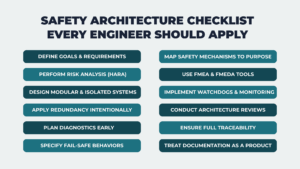
1. Define Safety Goals and Requirements Early
Start with a clear understanding of system-level hazards. A hazard analysis identifies potential failure modes, classifies their severity, and evaluates how controllable they are. From this analysis, define:
- Safety Goals (SGs)
- Functional Safety Requirements (FSRs)
- Technical Safety Requirements (TSRs)
These requirements form the foundation of every design decision that follows.
2. Perform Comprehensive Hazard and Risk Analysis (HARA)
Use HARA to classify hazards based on Severity (S), Exposure (E), and Controllability (C). This classification drives the system’s Safety Integrity Level (ASIL or SIL), which defines the level of discipline required in all following design activities. An incomplete analysis weakens your safety argument and creates certification gaps that are often difficult to close later.
3. Design with Modularity and Isolation in Mind
Separate your safety-critical components from non-critical ones. Use hardware partitioning, power isolation, or independent execution environments to stop faults from spreading across the system. This approach makes it easier for you to validate, test, and certify your design.
Build with modularity so you can make updates without compromising safety. You’ll keep your system flexible, reliable, and easier to maintain.
4. Apply Redundancy with Intent
Redundancy should address well-understood failure modes. Use independent cores, channels, or diverse implementations such as different algorithms or compilers that avoid shared points of failure. Validate each redundancy path on its own, especially in dual-channel or multi-core architectures, to detect hidden dependencies and reduce systemic risks.
5. Plan Diagnostic Coverage Early and Thoroughly
A complete safety architecture includes diagnostic functions that detect faults in hardware, software, and data handling. Use tools such as built-in self-tests (BIST), watchdog timers, CRCs, and timing monitors to catch failures during operation. These mechanisms must detect faults within a defined window. For systems with high ASIL ratings, diagnostic coverage often needs to exceed 90%. Meeting this level requires planning from the early design stages.
6. Define Explicit Fail-Safe and Fault-Tolerant Behaviors
Every safety mechanism must serve a specific function in the overall design. Document when it activates, what it checks, how it reacts to faults, and how it depends on other components. This level of detail shows that safety decisions were made by design, not as an afterthought. It also prepares the system for formal reviews.
7. Map Safety Mechanisms to Their Functional Purpose
Every safety mechanism must serve a specific function in the overall design. Document when it activates, what it checks, how it reacts to faults, and how it depends on other components. This level of detail shows that safety decisions were made by design, not as an afterthought. It also prepares the system for formal reviews.
8. Use FMEA and FMEDA to Analyze Failure Behavior
Failure Modes and Effects Analysis (FMEA) and its diagnostic variant (FMEDA) help teams understand how faults may spread and whether existing mechanisms will detect them. These tools are essential for complex systems where hardware, software, and user actions interact in ways that create hard-to-see risks.
9. Use Watchdogs and Cross-Monitoring as Final Defenses
Some faults will bypass built-in diagnostics. Use independent hardware watchdogs and cross-monitoring between cores or subsystems to catch failures like task starvation or timing violations. These methods act as a last line of defense to bring the system to a safe condition before harm can occur.
10. Review Safety Architecture at Key Development Points
Hold formal reviews to confirm that your safety architecture supports the project’s goals. Reviews should examine hazard mitigation strategies, diagnostic plans, and system partitioning. Independent reviewers often identify problems internal teams may overlook.
11. Maintain Full Traceability from Start to Finish
Every safety requirement must be linked to its implementation and verification step. This traceability shows that no requirement has been lost or ignored. It is also a key part of certification. Trying to add traceability at the end of the project usually leads to errors or missing data.
12. Treat Documentation as Part of the Product
Documentation supports every technical decision in a safety project. Record each hazard analysis, design change, test result, and review comment. Keep these records versioned and well-organized. Poor or missing documentation can lead to certification failure, even if the system itself is technically sound.